
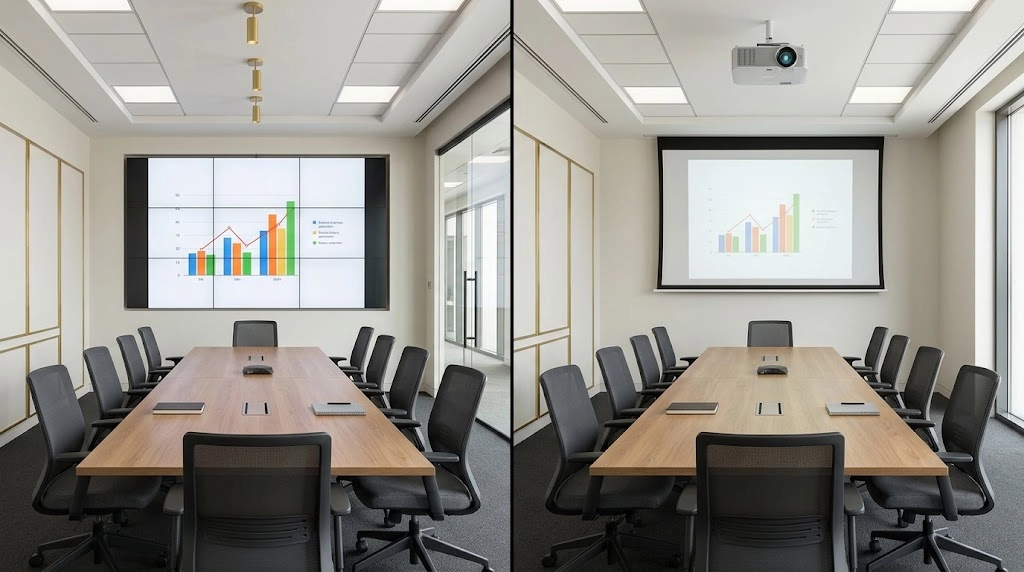
Quick answer: Shortlist a suitably specified video wall when a permanent display must present a large, visible image in a public or well-lit space. Consider projection when a room needs a large image and offers suitable lighting control, mounting positions and sightlines. Confirm the choice using representative content, actual viewing positions and a complete installation and operating-cost assessment.
Video Wall vs Projector: What Is the Difference?
A video wall creates an image using multiple display panels or LED modules. A projector directs light onto a separate screen or suitable projection surface. The complete system may also include source equipment, signal processing, controls, networking and audio.
Tiled LCD Video Walls
A tiled LCD video wall combines several flat-panel displays into a larger canvas. The panel edges create visible boundaries, even when narrow-bezel products are used.
Those boundaries may be acceptable when separate sources occupy individual panels. They need more consideration when text, diagrams or faces extend across panel joints.
Direct-View LED Video Walls
A direct-view LED wall builds the image from LED modules. It does not have the same panel bezels as a tiled LCD wall, although installation alignment and calibration still affect the finished appearance.
Pixel pitch, which describes the spacing between pixels, is an important selection factor. The appropriate pitch depends on viewing distance, image size, required detail and budget.
A direct-view LED wall is different from an LCD display that uses an LED backlight. The supplier should identify the actual display technology in the proposal.
Projection Systems
A projection system combines a projector, suitable lens arrangement and screen or projection surface. Image size and projector placement depend on the available room geometry and the selected equipment.
Some projects use more than one projector, but that introduces additional alignment and processing considerations. A single-projector installation and a multi-projector system should not be compared as though they have the same complexity.
| Consideration | LCD Video Wall | Direct-View LED Wall | Projection |
|---|---|---|---|
| Image construction | Multiple flat-panel displays | LED modules forming a display canvas | Projected light on a separate surface |
| Visible boundaries | Panel bezels affect the image layout | Module alignment and calibration affect uniformity | A single projector has no panel-bezel grid |
| Main spatial requirement | Suitable supporting wall or structure | Suitable structure and service access | Suitable screen position and projection geometry |
| Detail assessment | Panel resolution, scaling and bezel placement | Pixel pitch, canvas resolution and viewing distance | Resolution, image size, focus and screen characteristics |
Image Visibility in Bright and Dark Rooms
Ambient light affects the image people see. Assess daylight, artificial lighting, reflections and the direction of incoming light before selecting either technology.
Bright Lobbies and Public Spaces
A suitably specified direct-view display can be a practical candidate where the room needs to remain brightly lit. However, glare, reflections, viewing angles and direct sunlight still need assessment.
Projection requires particular attention to light reaching the screen. Ambient light can reduce the visible contrast of a projected image, making dark areas appear lighter and reducing the separation between image details.
A brighter projector or an appropriate screen may help in some conditions, but the complete result depends on the room. Request a demonstration or documented assessment using the intended image size and lighting conditions.
Rooms With Lighting Control
Projection can be a suitable option where lighting and daylight can be managed. Consider whether users can still take notes, move around and participate comfortably while the image remains readable.
For a fair video wall vs projector comparison, assess both options under the lighting conditions expected during normal use. A demonstration in a dark showroom may not represent a glass-fronted lobby or a boardroom used throughout the day.
Compare Complete Image Performance
Projector light output and direct-view display brightness are commonly expressed using different measurements. A lumen figure and a nit figure are not a direct like-for-like comparison.
Ask the designer to explain the expected visible result at the screen, including contrast, readability and viewing positions, rather than choosing equipment from one headline brightness number.
Screen Size, Viewing Distance and Sightlines
The right image size depends on the content and the nearest and farthest viewers. A large display is not automatically readable if its layout contains text or diagrams that are too small.
Start With Representative Content
Collect examples of what the system must show:
- Presentation slides and charts.
- Spreadsheets or technical drawings.
- Visitor directories and wayfinding information.
- Live video and remote meeting participants.
- Several information sources displayed together.
Test the smallest important detail from the intended viewing positions. A display suitable for large presentation headings may not suit detailed operational information.
AVIXA’s display image size guidance considers the displayed content and viewing area, providing a more useful starting point than selecting a diagonal size alone.
Check Obstructions and Viewing Angles
Review seated and standing viewers, furniture, columns, lighting fixtures and people moving through the space. The image needs to be positioned so that important content remains visible.
For an LED wall, assess pixel pitch from the closest relevant position. For an LCD wall, check whether panel boundaries interrupt important content. For projection, assess focus, screen suitability and the image from different seating positions.
Content Layout and Multiple Sources
Either display approach can show multiple content sources when the complete system supports the required processing. The number of physical panels does not determine the number of usable content windows.
Video Walls Need Suitable Processing
A video wall may use a processor or compatible display functions to arrange sources across its canvas. Confirm the required input types, supported layouts, output resolution and operator controls.
For example, a monitoring space might need several independently positioned views, while a lobby may need one continuous image. These are different content and processing requirements.
Projectors Can Display Combined Images
A projector can display a composite image supplied by a suitable computer or processor. Some projectors also offer their own multi-source features, depending on the model.
Dividing an image into several windows reduces the area available for each source. Check whether text, charts and participant video remain useful after the layout is divided.
Make Routine Operation Understandable
When comparing video wall vs projector systems, ask how users will select sources, change layouts and restore the normal display arrangement.
Include an agreed default layout and recovery procedure. For visitor-facing communication, plan the content alongside the property’s wider digital signage system.
Installation Space, Mounting and Electrical Needs
The installation assessment should include the display structure, power, signal routes, ventilation and access for servicing. These requirements vary by product and location.
Video Wall Structure and Access
A video wall requires a suitable mounting structure for the specified equipment. Confirm the supporting construction, display depth, cable access and manufacturer-required clearances.
Service access may be from the front, rear or another arrangement supported by the chosen system. A wall that fits visually may still need additional space for maintenance.
Projector Position and Throw Distance
Projection requires a compatible relationship between lens, image size and projector position. Throw distance is the distance between the projector and the image surface.
Use the manufacturer’s calculator or product documentation to establish suitable placement. Check ceiling services, lighting fixtures, presenter movement and whether people can interrupt the projected image.
Short-throw equipment may help in some layouts, but it still needs a suitable mounting position and compatible screen arrangement.
Power, Cabling and Ventilation
Confirm electrical requirements and installation responsibilities with the qualified project team. Include source equipment, processors, network devices and controls in the overall design.
Signal routes should be planned alongside the property’s network and structured cabling infrastructure. Follow the equipment manufacturers’ ventilation, clearance and environmental requirements.
Maintenance and Expected Operating Hours
Neither a video wall nor a projector should be assumed to be maintenance-free. Compare the maintenance instructions, operating conditions and support arrangements for the actual equipment proposed.
Video Wall Maintenance
Ask how the supplier will handle cleaning, calibration, alignment and replacement of failed components. Confirm which spare parts should be retained and how a replacement panel or module will be matched to the existing installation.
A modular design can change how repairs are performed, but it does not by itself establish a guaranteed repair time or uninterrupted operation.
Projector Maintenance
Maintenance depends on the projector’s light source, optical design, ventilation system and environment. Some products require filter maintenance or lamp replacement; others use different maintenance arrangements.
A laser light source does not remove the need to follow the product’s cleaning, environmental and servicing instructions. Ask how maintenance access will work at the installed height.
Read Operating Ratings Carefully
Check the permitted operating schedule, specified environmental conditions and the meaning of any stated light-source or display-life figure.
A rated operating life, an allowable daily duty cycle and a warranty period describe different things. The proposal should identify the relevant manufacturer documentation rather than applying one general lifespan to every product in the category.
Video Wall vs Projector: Upfront and Long-Term Cost Factors
Compare complete project costs for the same content, image size, operating schedule and support requirements. Equipment purchase prices alone do not establish which solution offers the more suitable lifecycle cost.
| Cost Area | What to Include |
|---|---|
| Display equipment | LCD panels or LED modules, or the projector, lens and screen |
| Supporting infrastructure | Mounting, structural preparation, power, cabling and ventilation provisions |
| Signal processing | Source devices, switching, scaling and required multi-window processing |
| Controls and commissioning | Configuration, calibration, testing, documentation and user training |
| Operation | Expected electricity use, relevant subscriptions and routine administration |
| Maintenance and support | Cleaning, access equipment, spare parts, servicing and replacement planning |
Keep Proposal Assumptions Consistent
A proposal for a basic presentation system should not be compared directly with one designed for continuous multi-source monitoring. Record the performance and operating requirements that both suppliers must address.
If electricity costs are estimated, request the stated equipment power assumptions, operating schedule and tariff basis. Avoid treating a product’s maximum power figure as a complete operating-cost forecast.
Include Access and Disruption Costs
High mounting positions, restricted working hours and difficult service access can affect installation and maintenance costs. Ask what is included if equipment must be removed, recalibrated or replaced.
No universal price range is provided here because the required equipment and site conditions can change the project scope substantially.
Best Fit for Lobbies, Boardrooms and Event Spaces
Choose according to the room’s actual tasks. The examples below identify factors to assess rather than prescribing one technology for every property.
| Space | Main Questions | Assessment Focus |
|---|---|---|
| Lobby or reception | Must the display remain visible in daylight, and how close can visitors stand? | Ambient light, reflections, viewing distance, content layout and operating hours |
| Boardroom | Will users read detailed information, join video meetings or compare several sources? | Text readability, seating positions, conferencing and straightforward controls |
| Event or training space | Will layouts and audience sizes change, and can lighting be controlled? | Image size, sightlines, presenter movement, setup procedures and service access |
Lobbies and Reception Areas
A permanent video wall can be shortlisted for a prominent reception display, subject to the actual lighting, resolution and structural requirements. Projection may be considered where the location, screen and light control support the intended result.
Keep directory text and visitor instructions readable. For the wider communication context, see Smartopia’s article on digital signage in managed properties.
Boardrooms and Collaboration Spaces
In a boardroom, prioritize the smallest information users must read and the furthest relevant seat. Test the intended presentation and meeting layouts rather than using demonstration video alone.
Where room cameras can capture the display, check its appearance in the actual meeting or recording workflow. Coordinate the display choice with the complete conference-room AV system.
Event and Training Spaces
Projection can be considered where a large image and flexible room arrangement are important, provided the lens position, lighting and screen meet the requirements. An LED wall may suit a planned permanent or event-specific installation where the structure, setup and service arrangements support it.
For either approach, define who operates the system and how the room returns to its normal configuration after an event.
A Practical Selection Checklist
Use these nine checks to structure a video wall vs projector assessment before requesting final proposals.
- Define the content: Collect representative slides, documents, video and multi-source layouts.
- Map the audience: Record the closest, furthest and off-centre viewing positions.
- Assess lighting: Check daylight, artificial lighting, glare and available light control.
- Confirm image requirements: Establish the active image size, resolution and smallest readable detail.
- Review the physical installation: Check structure, mounting positions, projection geometry and service access.
- Plan infrastructure: Define power, signal routes, networking, processing and controls.
- Verify operating conditions: Match the equipment to the intended schedule and environment.
- Compare lifecycle costs: Include maintenance, support, access requirements and replacement planning.
- Agree on acceptance tests: Specify how the finished system will be checked using real content and operating conditions.
The final video wall vs projector decision should be supported by the space, content and operating requirements. A product demonstration is most useful when it represents those conditions and the people who will use the system.
Smartopia provides digital signage and video wall services in Toronto and the GTA. Share the room layout, intended content and operating requirements to discuss an appropriate assessment and project scope.
Frequently Asked Questions
Is a video wall better than a projector in a bright lobby?
A suitably specified video wall can be a practical option for a bright lobby, but the result depends on the display technology, brightness, reflections and viewing positions. Projection needs assessment of ambient light, screen characteristics and projector output. Evaluate either option under the lobby’s normal daytime conditions before selecting equipment.
Which option is easier to maintain?
There is no universal answer. Video walls may require cleaning, calibration and component replacement, while projectors have model-specific cleaning and servicing requirements. Compare the manufacturer’s maintenance schedule, installation height, access arrangements, spare parts and support terms for the actual systems proposed.
Can a projector show multiple content sources at once?
Yes, when the projector supports the required feature or receives a combined image from a suitable computer or processor. Confirm supported inputs, layouts and output resolution. Each source occupies part of the available image, so readability must be checked at the intended viewing distance.
What should be assessed before choosing either display?
Assess representative content, audience positions, ambient light, required image size, resolution, mounting conditions, power, cabling, processing and operating hours. Include maintenance access, controls, support and lifecycle costs. Agree on acceptance tests that demonstrate the finished installation using the content and room conditions it is intended to support.
Comments are closed