
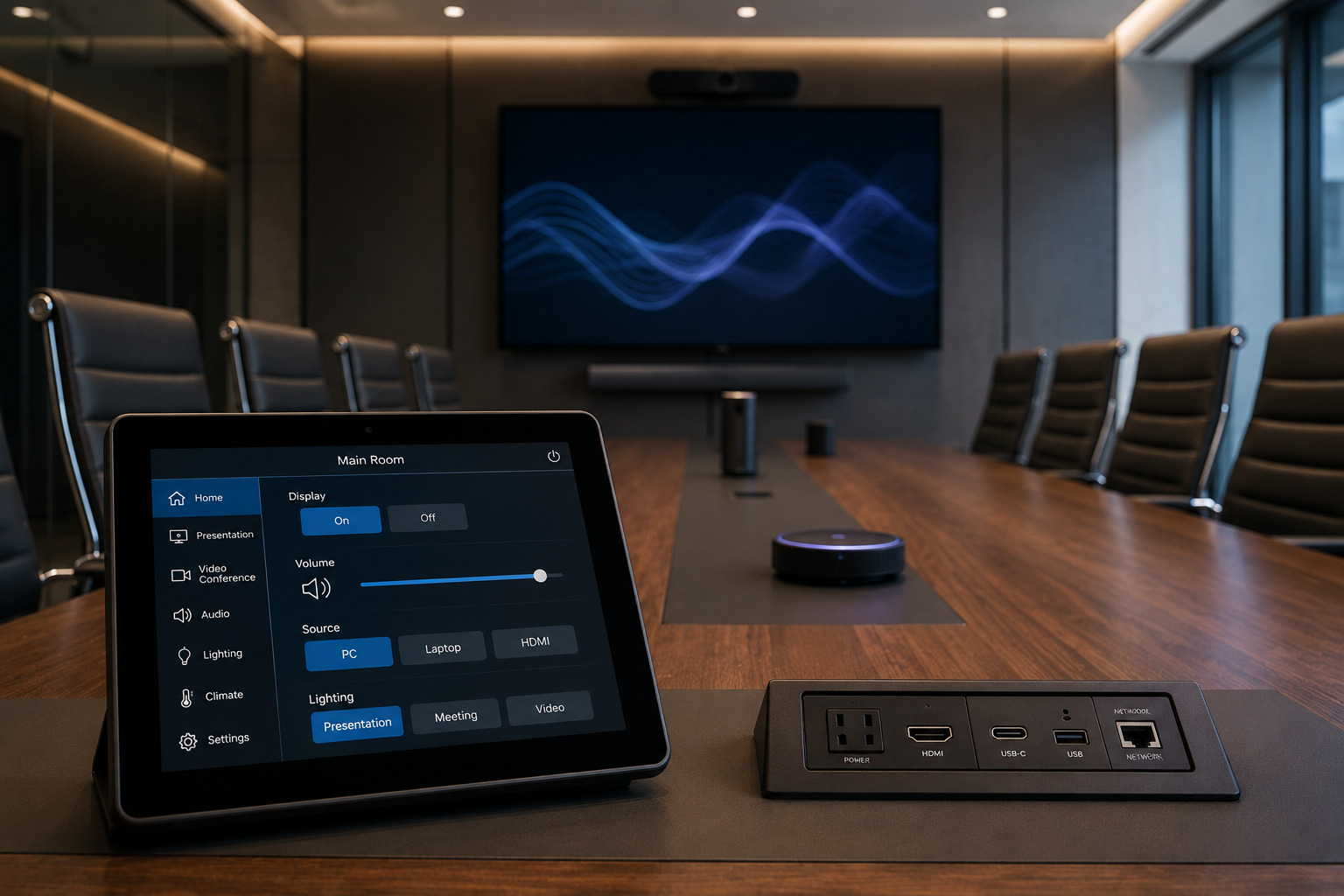
AV Control System Programming: 7 Essentials for Reliable Meeting Rooms
AV control system programming defines how room interfaces, controllers and compatible devices respond to user actions and system events. It coordinates functions such as display power, source selection, audio levels and supported room settings. Reliable programming combines clear operating sequences, verified device compatibility, meaningful feedback, error handling and acceptance testing before the room is handed over.
For employees, the result should be straightforward: start a meeting, share content, adjust the room and end the session without navigating unrelated device controls. Behind those actions, the system must account for equipment startup times, available connections and what happens when a device does not respond.
This guide explains the decisions that make corporate AV controls easier to operate, test and maintain.
What Does AV Control System Programming Include?
AV control programming connects the intended user experience with the commands and logic supported by the installed equipment. Depending on the platform, the work may involve configuration tools, reusable modules, supported drivers, custom scripting or a combination of these methods.
A typical scope may include:
- Touchscreen, keypad or remote-control behaviour.
- Display startup, shutdown and input selection.
- Audio routing, volume limits and mute controls.
- Supported camera controls and presets.
- Presentation-source selection.
- Compatible lighting and shade commands.
- Room-combining logic where required.
- Device feedback, timeouts and recovery behaviour.
Programming does not replace appropriate equipment selection, cabling, acoustics or network design. A well-designed interface cannot compensate for an unsupported device connection or inadequate microphone coverage.
For the complete room design and installation scope, explore Smartopia’s corporate conference room AV solutions.
How Is Programming Different From Installation and Configuration?
Installation places and connects the equipment. Configuration sets supported product options. Programming defines how the system coordinates actions, responds to conditions and presents controls to users.
| Activity | Primary purpose | Example |
|---|---|---|
| Installation | Provide the physical system | Mount displays, connect microphones and label cables |
| Configuration | Set equipment and platform options | Assign supported device settings and select approved peripherals |
| Control programming | Coordinate system behaviour | Define what happens when someone selects Present |
| Commissioning | Verify the completed system | Test workflows, failure behaviour and agreed performance criteria |
Some rooms can meet their requirements using standard configuration. Others need additional programming for multiple sources, combined spaces or cross-system interactions. The scope should follow the required functions rather than assuming every room needs extensive custom code.
1. Write the Room’s Sequence of Operations First
A sequence of operations describes how the room should behave in plain language. Agree on it before developing the interface so stakeholders can review the expected experience without needing to interpret code.
For each user action, define the starting condition, the requested changes and the expected result.
- Start Meeting: Prepare the agreed equipment and show the relevant meeting controls.
- Present: Select the intended source and route content to the required displays.
- Adjust Audio: Change the appropriate audio level within approved limits.
- End Session: Stop supported sharing functions and return the room to its agreed default state.
Define exceptions as well. What happens if the display is already on, a source is unavailable or someone presses the same button several times?
A conferencing platform’s join function should remain within its supported workflow. A room-control button should not imply that it can start any meeting or application regardless of platform compatibility, permissions or licensing.
2. Verify the Exact Device Interfaces
Equipment connected to the same network is not automatically controllable through the same system. Compatibility depends on the device model, software version, available interface and functions exposed by the manufacturer.
For each controlled device, confirm:
- The supported control method, such as IP, serial or infrared.
- The commands needed for the approved room workflow.
- Whether the device reports its actual state.
- Any authentication, driver or licence requirements.
- Relevant software and firmware compatibility.
- Behaviour after standby, restart or connection loss.
Prefer explicit commands such as Power On and Power Off when supported. A single toggle command can produce the wrong result if the controller’s assumed state differs from the equipment’s actual state.
Infrared and other one-way interfaces may offer limited confirmation. Document those limitations rather than presenting every command as a verified action.
Existing equipment can sometimes remain in service, but its required functions should be tested before reuse is approved.
3. Build the Interface Around Workplace Tasks
Employees generally need meeting actions rather than equipment-management screens. Labels such as Present Laptop, Adjust Volume and End Session communicate a purpose more clearly than technical device names.
Use consistent terminology across rooms and show only the controls relevant to the room’s capabilities. A small meeting room should not display functions available only in a divisible training space.
- Keep frequent actions easy to find.
- Separate everyday operation from administrator settings.
- Show which source or room mode is selected.
- Make mute and volume states understandable.
- Provide a clear route back to the main controls.
- Use readable labels and adequately separated interactive elements.
The W3C’s interface design guidance highlights clear navigation, sufficient contrast, descriptive labels and identifiable feedback. These principles can inform digital AV interfaces, while accessibility should also be evaluated on the actual device with its intended users.
4. Distinguish Commands From Confirmed Results
Sending a command does not prove that a device completed it. A display may still be starting, a connection may be unavailable or the requested input may not exist on that model.
Where supported, use device feedback to confirm the result before advancing the operating sequence. Where feedback is unavailable, use documented timing assumptions and avoid showing an unverified state as confirmed.
| Condition | Programming consideration | User-facing result |
|---|---|---|
| A display is starting | Wait for supported readiness feedback or a documented startup interval | A clear starting status instead of an immediate ready message |
| A device does not respond | Apply a defined timeout and limited retry policy | An understandable error and an approved next step |
| A user repeats an action | Prevent conflicting or duplicate command sequences | Stable behaviour while the original request is processed |
| A connection returns | Refresh device state before resuming normal control | An interface that reflects the recovered system |
Errors should help support teams diagnose the problem without overwhelming users. The interface may identify an unavailable display while technical logs record the failed connection or command.
5. Coordinate Network Access and Room Automation
IP-controlled equipment needs approved communication paths. Provide IT with the device inventory, required services and access requirements before commissioning.
Network segmentation must preserve authorised control traffic while restricting unnecessary access. Creating a VLAN alone does not establish the complete security policy, and network separation does not guarantee protection from every threat.
Use the AV network integration planning guide to coordinate addressing, dependencies and cross-system responsibilities.
When AV controls interact with lighting or shades, agree which system owns schedules, overrides and final device state. Confirm the scope with the building management system integration team where applicable.
Occupancy-based shutdown also needs careful design. A motion sensor may not reliably represent whether a quiet meeting is still in progress. Use suitable conditions, delays and overrides, and verify that the sequence does not interrupt active sessions or essential equipment.
6. Commission Normal Operation and Failure Scenarios
Commissioning should prove that the approved sequence works with the actual equipment, network policies and user devices. Test complete workflows rather than checking each button in isolation.
- Start the room from its normal idle state.
- Switch between approved presentation sources.
- Test volume, mute and supported camera functions.
- Complete a conferencing session with a remote participant.
- Check lighting and shade interactions where included.
- End the session and confirm the agreed reset behaviour.
- Test repeated commands and rapid changes of selection.
- Verify agreed recovery behaviour during a controlled maintenance window.
Record the expected and actual result for each test. Assign unresolved issues to an owner and repeat affected tests after corrections.
Include a user who did not design the system. Their experience can reveal unclear labels or missing feedback that a familiar technician may overlook.
After handover, the meeting room AV checklist can support routine readiness checks. It complements commissioning rather than replacing it.
7. Document the Program and Control Future Changes
A room becomes harder to support when its installed program, device configuration and documentation no longer match. Establish a clear baseline at handover and update it whenever approved changes are made.
Agree on the following deliverables in the project scope:
- The approved sequence of operations.
- Interface layouts and room-specific settings.
- Device models, addresses and supported software versions.
- Program or configuration backups.
- Source files, editing rights and licences as specified in the contract.
- Recovery instructions and known limitations.
- Acceptance-test records.
- Support ownership and change-request procedures.
Before changing a driver, device or program, assess the functions it could affect. Preserve the working version, test the change and define a recovery approach.
For ongoing maintenance responsibilities and escalation arrangements, review Smartopia’s managed AV support and maintenance service plans.
Practical Example: A Presentation Sequence With Error Handling
Illustrative scenario: A corporate room needs a Present Laptop action that prepares a display, selects an approved input and sets an appropriate initial audio level. This is a programming example, not a reported Smartopia client project.
- The user selects Present Laptop.
- The controller checks the display state where feedback is available.
- If required, it sends the supported power-on command.
- It waits for readiness according to the verified device behaviour.
- It selects the presentation input and applies the agreed audio settings.
- The interface shows the selected mode and available adjustments.
- If the display fails to respond, the sequence stops at a defined timeout and presents a useful message.
The user can still adjust volume or end the session through clear controls. The support team can review the recorded failure point instead of guessing which part of the sequence stopped.
What Affects AV Control Programming Scope and Cost?
Programming effort depends on the required behaviour and the work needed to verify it. The number of buttons alone is a poor measure of complexity.
- The number of room types and operating modes.
- The availability of supported device drivers and feedback.
- Custom interfaces or unusual workflows.
- Room-combining and source-routing requirements.
- Lighting, shading or other external integrations.
- The condition and documentation of an existing program.
- Testing, training and handover requirements.
- Post-installation revisions and support scope.
Ask for a quotation tied to an agreed sequence, deliverables and acceptance criteria. For an existing system, establish whether the necessary editable files and access permissions are available before estimating modification work.
Frequently Asked Questions
What is AV control system programming?
It is the development or configuration of the logic that coordinates supported AV devices and their user interfaces. It defines commands, operating sequences, feedback, error handling and room behaviour.
Does every meeting room need custom programming?
No. Some rooms can meet their requirements using standard platform configuration. Additional programming may be needed for more complex interfaces, multiple sources, combined rooms or external system integrations.
Can existing equipment work with a new control system?
Sometimes. Verify the exact model, supported interface, required functions and software compatibility. An Ethernet connection or shared brand name does not guarantee that all desired controls are available.
Can programming eliminate audio or video delay?
No. Programming can coordinate operations, but media delay also depends on processing, networks, conferencing services and equipment. Performance must be assessed across the complete system.
What happens when a controlled device stops responding?
The program should follow a defined timeout and recovery procedure. Where practical, it should identify the unavailable function, preserve unaffected controls and provide an approved next step for the user.
Who should receive the program files?
File delivery, ownership, licences and editing rights should be agreed in the contract. The client should understand which materials are included and how the installed system can be restored or modified later.
Can several rooms share the same control layout?
Yes, where their functions are sufficiently similar. Standard layouts can make operation more consistent, but each room still requires its own device settings, documented exceptions and testing.
Plan Corporate AV Controls Around Real Workflows
Reliable AV control system programming begins with a clear sequence and ends with tested behaviour, usable controls and maintainable documentation. The interface should make the room understandable while the underlying logic handles timing, feedback and exceptions.
To discuss a new room or an existing control-system upgrade, contact Smartopia with your equipment list, room functions, current issues and available program documentation. These details help establish the compatibility checks and programming scope needed for the project.

Comments are closed