
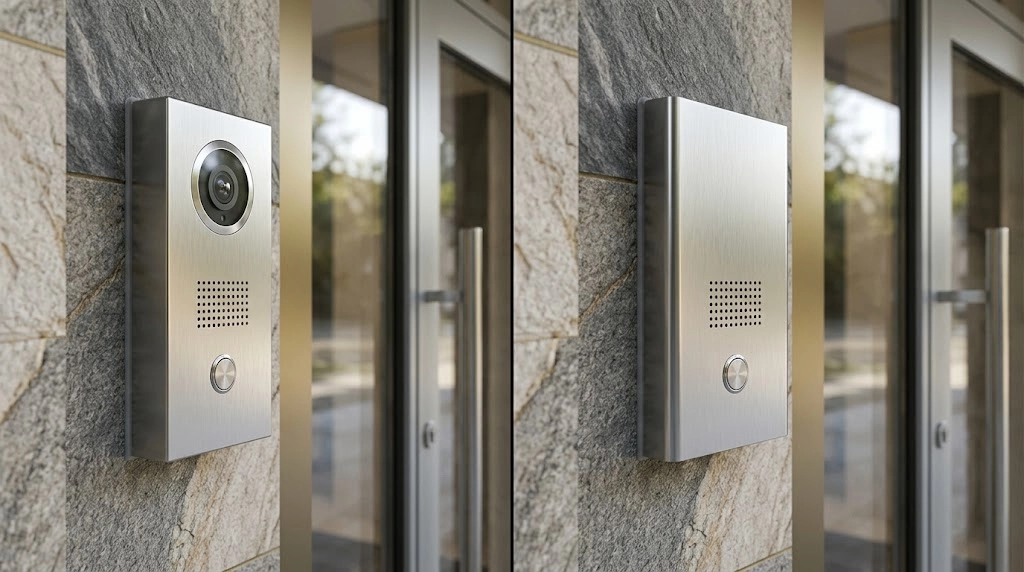
The choice also involves accessibility, existing wiring, privacy, mobile answering and integration with door hardware. A video intercom does not automatically record visitors, and an audio intercom does not necessarily lack mobile or network features. Those capabilities depend on the selected equipment and configuration.
This guide compares both options for condominiums, offices and gated properties. It focuses on the decisions building owners and property managers should make before approving an installation or upgrade.
Quick answer: In a video intercom vs audio intercom comparison, video adds visual information that may help the person answering assess an entry request. Audio can suit locations where voice communication meets the defined requirement. Choose according to visitor procedures, user accessibility, infrastructure, privacy and the complete operating cost.
Video Intercom vs Audio Intercom: How Do They Work?
Both systems allow a visitor at an entrance to contact a resident, receptionist or other authorized person. Where the installation supports it, the person answering can then send an approved door-release command.
How an Audio Intercom Works
An audio intercom carries a voice conversation between the entrance and an answering device. Depending on the system, that device might be a dedicated handset, an indoor station, a compatible telephone or an application.
Audio systems can use different architectures, including dedicated building wiring or an IP network. The absence of a camera does not establish how calls are routed or which administrative features are available.
How a Video Intercom Works
A video intercom adds a camera at the entrance and a compatible way to view the visitor. The answering device and communication path must support the required video function.
Some arrangements operate between devices on a local network. Others use hosted services, telephone-system integration or internet-based applications. Confirm the actual architecture rather than assuming every video intercom works in the same way.
| Consideration | Audio Intercom | Video Intercom |
|---|---|---|
| Visitor communication | Voice conversation | Voice conversation with a supported camera view |
| Information available when answering | What the visitor says and any approved supporting process | Voice information plus the image available from the entrance camera |
| Mobile answering | Depends on the selected system | Depends on the selected system and video support |
| Recording | Must be assessed as a separate function | Must be assessed as a separate function |
| Existing wiring compatibility | Requires assessment of the proposed equipment | Requires assessment of the proposed equipment and transmission method |
| Door-release integration | Requires compatible controls and door hardware | Requires compatible controls and door hardware |
Visitor Verification and Entry Experience
A video intercom vs audio intercom decision should consider the information the person answering actually needs. A camera can add context, but a visible image does not independently prove a visitor’s identity or authority to enter.
Voice Communication Still Matters
Clear sound is important in both systems. Traffic, wind, garage equipment and background conversations can affect the entry experience.
Assess audio at the intended entrance and answering location. Check whether visitors and staff can understand each other during normal operating conditions, including times when the surrounding area is busy.
What Video Can Add
A camera view may help staff see whether the caller is standing at the expected entrance or holding an item relevant to the visit. Its usefulness depends on camera position, lighting and what appears within the field of view.
For example, a low camera position or strong backlighting may produce an image that offers limited information. Test the actual view from the answering device rather than relying only on the camera’s specification.
Define the Admission Procedure
Agree on what residents or staff should confirm before releasing an entrance. The procedure might involve checking an appointment, contacting the intended recipient or following an approved delivery process.
Intercoms support visitor communication. Wider permissions, resident credentials and restricted-area access should be planned within the building’s access control system.
Resident and Staff Accessibility
Accessibility depends on the complete interaction at both ends of the call. Adding video does not automatically make an entrance usable for every visitor, resident or staff member.
Assess the Entrance Interface
Review the location and operation of call buttons, directories and displays. Consider whether users can reach the controls, read instructions, identify the correct destination and understand the system’s response.
Useful assessment questions include:
- Can a seated visitor operate the entrance station?
- Are names, numbers and instructions legible under actual lighting?
- Is call progress communicated clearly?
- Can users obtain help without navigating an unfamiliar interface?
- What alternative is available for someone who cannot complete a voice conversation?
Check the Answering Experience
A resident may need a suitable indoor station rather than a smartphone-only arrangement. A staff member may need a clear visual indication of an incoming call or another supported communication method.
Where a particular accessibility feature is required, confirm that the proposed model supports it and that it will be configured and tested. Product labels alone do not establish that the complete interaction meets the users’ needs.
Ontario’s accessibility guidance emphasizes communication that takes a person’s disability into account. Include user needs in the assessment and arrange appropriate review of the applicable requirements.
Mobile Answering and Remote Door Release
Mobile answering allows an approved user to receive an entrance call on a compatible phone where the system supports that service. Remote door release is a separate function that also requires appropriate permissions and integration.
Confirm Which Connections Are Required
For a meaningful video intercom vs audio intercom comparison, identify the dependencies of each proposed call path.
A local indoor station may communicate through the building network, while an off-site mobile application may depend on internet access and a hosted service. Other arrangements can use telephone-system integration.
Ask which functions remain available when:
- The building loses its internet connection.
- The entrance station loses its local network connection.
- A hosted service is unavailable.
- The resident’s phone has no data connection or battery power.
- Power is interrupted at a relevant system component.
Review Account and Permission Management
Define how residents or staff are added, removed and transferred between accounts. Confirm who can issue invitations, change answering destinations or operate the door-release function.
Ask about subscriptions, supported phone platforms and the process for replacing a lost device. Include an alternative entry or answering procedure for users who cannot rely on a mobile application.
Test the Complete Call
Commissioning should check the visitor call, audio, supported video and authorized release command together. Also test missed calls, unanswered calls and the approved fallback destination.
Privacy, Recording and Data Considerations
Live visitor verification, recorded video, recorded audio and access-event logs are separate functions. Identify which are required and how each will be used before enabling them.
Define the Purpose of Any Recording
A video intercom does not need to be treated as an instruction to record every visitor. Establish the purpose, camera coverage and appropriate handling of any information collected.
Canadian privacy guidance for private-sector video surveillance recommends evaluating the need for surveillance and limiting unnecessary intrusion. Audio recording requires its own assessment rather than being enabled simply because a device supports it.
Document Information Handling
For the functions included in the proposal, establish who can access records, where information is stored, how long it is retained and how it is deleted. Review relevant service-provider access and account-transfer arrangements.
Applicable privacy requirements depend on the property and its operations. Have the proposed policy reviewed for that context. If the intercom also connects with security cameras and recording systems, document the scope of that connection.
Wiring and Network Requirements
Existing audio intercom wiring may be reusable for some upgrades, but compatibility must be confirmed for the selected equipment. A camera cannot simply be added to every existing audio installation.
Assess Existing Infrastructure
The survey should identify cable type, condition, route, topology, distance, power arrangements and connected devices. Check available documentation against what is installed.
Some manufacturers offer products or converters intended for selected legacy-cabling arrangements. Their compatibility limits remain product-specific. Do not assume that one manufacturer’s retrofit equipment will work with another system.
Plan IP Network Requirements
For an IP-based installation, confirm the required connections, power method, network configuration and call-handling architecture.
The network team should define appropriate access permissions, remote-support arrangements and update responsibilities. Coordinate installation requirements with the property’s network cabling infrastructure.
Separate Local Operation From Internet Services
A system can use IP networking without requiring the public internet for every local function. Conversely, a working local connection does not establish that off-site mobile answering will remain available.
Request a simple system diagram showing the entrance station, answering devices, controllers, network equipment and any hosted service.
Integration With Access Control and Door Hardware
Either intercom type may support a controlled-entry workflow when compatible interfaces and appropriate door hardware are provided. The integration should be designed around the actual opening and operating requirements.
Keep Visitor Calls and Access Permissions Clear
An intercom call lets a person request entry. A resident credential or staff access group establishes a different form of permission. Define how those functions interact without giving users unnecessary authority.
For an explanation of permission models and credential methods, see types of access control systems.
Assess the Complete Door Assembly
The entrance station is only one part of the opening. The project team should review the door, frame, locking hardware, closer, power supply, release interface and any required monitoring.
Ask how the release-control arrangement is protected from unauthorized operation or tampering. The appropriate method depends on the equipment and system architecture.
Document Exit and Failure Behaviour
Entry authorization and safe exit are separate considerations. Have the proposed door operation reviewed by the qualified project team against the applicable requirements.
Document expected operation during power loss, communication faults and relevant emergency conditions. Test the approved behaviour before handover rather than applying a blanket lock-or-unlock instruction to every entrance.
Video Intercom vs Audio Intercom: Installation and Ongoing Costs
Compare complete proposals for the same entrances, users and operating requirements. The cost difference is not determined by the camera alone.
| Cost Area | What to Confirm |
|---|---|
| Entrance equipment | Stations, directory interface, mounting and required accessories |
| Answering devices | Indoor stations, handsets, compatible phones or application requirements |
| Infrastructure | Cabling, converters, power supplies, network equipment and pathways |
| Door integration | Controllers, release interfaces, locking hardware and related work |
| Software and services | Licences, hosted services, mobile features and recurring charges |
| Commissioning and support | Configuration, testing, training, documentation and fault response |
Check Upgrade Disruption
An existing building may need temporary entry procedures while equipment is changed. Confirm work locations, resident access arrangements and responsibilities for communicating the interruption.
A retrofit that retains suitable infrastructure may have a different scope from a full replacement, but reuse should follow assessment rather than an assumption of compatibility.
Compare Ongoing Responsibilities
Ask who manages resident records, answers service requests, installs updates and handles provider changes. Confirm which charges increase with the number of users, entrances or enabled features.
No general price range is provided here because the condition of the property and the required features can change the project scope substantially.
Which Option Fits Condos, Offices and Gated Properties?
The video intercom vs audio intercom decision should reflect the entrance workflow and users. A camera may be useful at one location while voice communication meets the defined requirement at another.
| Property Type | Main Planning Questions |
|---|---|
| Condominium | How will residents answer visitors, update contact details and use the system without a smartphone? |
| Office | Who answers during and outside reception hours, and how is a visitor’s appointment confirmed? |
| Gated property | Can drivers reach and operate the station, and will audio and video remain useful in the entrance conditions? |
Condominiums
Condo projects should account for different resident needs, staff coverage, visitor procedures and resident turnover. Confirm the options for indoor answering devices, mobile services and assistance when the preferred method is unavailable.
Plan the intercom alongside the building’s wider residential technology systems.
Offices
Offices need an agreed answering destination during normal hours and an appropriate process when reception is unavailable. If calls can be redirected, confirm who controls that function and which entrances can be released.
Gated Properties
Review vehicle approach, station reach, environmental exposure, lighting, background noise and communication routes. Gate operation and its safety arrangements also need assessment by the appropriate specialists.
Nine Checks Before Selecting a System
- Define the entry procedure: Establish what must be confirmed before a visitor is admitted.
- Identify answering users: Include residents, reception, security and approved backup contacts.
- Assess accessibility: Review the entrance interface and answering methods with relevant user needs in mind.
- Confirm communication paths: Distinguish local calls, telephone integration and internet-based services.
- Review privacy: Define any recording, information access and retention requirements.
- Survey existing infrastructure: Verify cabling, power, networking and equipment compatibility.
- Assess door integration: Confirm the release interface, hardware and approved failure behaviour.
- Compare complete costs: Include installation, recurring services, administration and support.
- Agree on acceptance tests: Test representative calls, release commands, faults and fallback procedures.
A useful video intercom vs audio intercom comparison ends with a documented operating plan. The selected system should give users the information and communication methods they need while remaining practical to administer and maintain.
Smartopia supports access control and integrated entry-system planning in Toronto and the GTA. Share the property type, existing equipment and visitor-entry requirements to discuss an appropriate assessment.
Frequently Asked Questions
Can an existing audio intercom be upgraded to video?
Sometimes. The answer depends on the existing wiring, power, topology, entrance equipment and proposed answering devices. Some manufacturers offer retrofit products for selected legacy-cabling arrangements. A site survey and product-specific compatibility check are needed before deciding what can be retained.
Does a video intercom need internet access to work?
Not for every configuration. Some systems support local calls between compatible devices on a building network. Hosted services and off-site mobile answering may require internet connectivity. Ask the supplier to identify each function’s dependencies and demonstrate the approved operation during a connection failure.
Can residents answer visitors from a mobile phone?
Yes, where the selected system supports compatible mobile answering. Confirm phone requirements, account permissions, connectivity, subscriptions and whether video and remote release are included. Provide an appropriate alternative for residents who cannot use the application or whose phone is unavailable.
Can either system connect to existing access control?
Potentially. Compatibility depends on the intercom’s interfaces, access controller, locking hardware and required workflow. The project team should assess the full connection, protect release-control functions and test the approved operation. A shared brand name or network connection alone does not establish compatibility.
Comments are closed