
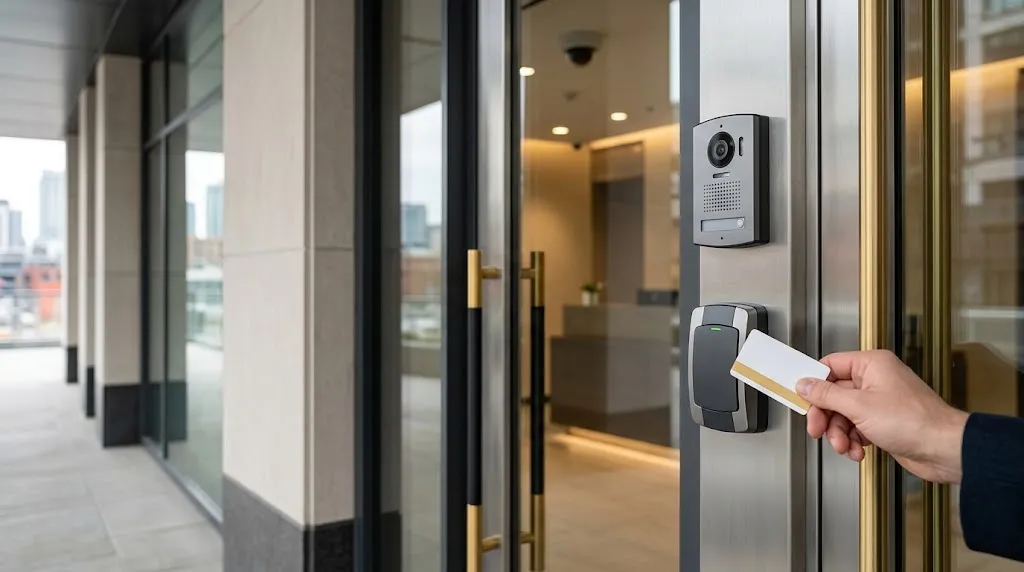
What Are the Main Types of Access Control Systems?
The term “access control type” is often used for several different things. A mobile credential describes how a person presents their identity. Role-based access control describes how permissions are assigned. A cloud platform describes where management services operate. These are separate decisions rather than competing alternatives.
For example, a condominium could use role-based permissions, mobile and fob credentials, cloud management and local door controllers within the same installation.
| Classification | What It Describes | Examples |
|---|---|---|
| Permission model | How access rights are assigned and enforced | Role-based, discretionary, mandatory and attribute-based |
| Credential method | How a person identifies themselves to the system | Cards, fobs, PINs, mobile credentials and biometrics |
| Management architecture | Where administration and related services operate | Cloud-based, on-premises and hybrid arrangements |
| Door hardware and connectivity | How readers, controllers and locks communicate and receive power | Wired readers, network controllers and wireless locksets |
These classifications help building owners compare proposals accurately. A statement such as “we recommend mobile access” does not explain who approves permissions, how doors operate during an outage or how an administrator removes a credential.
How Does Each Type Decide Who Can Enter?
Permission models establish the rules behind an access decision. In practical building systems, those rules commonly consider the person, the door, the time and the access group assigned to the credential. Actual features vary between platforms.
Role-Based Access Control
Role-based access control, or RBAC, assigns permissions to roles rather than configuring every person independently. In a building, roles might include residents, reception staff, cleaners, maintenance contractors and security personnel.
A cleaner could receive access to service entrances and designated floors during an approved evening schedule. A maintenance supervisor could receive broader access, while a temporary contractor receives permissions that expire at the end of the project.
This approach can simplify administration when many people share similar responsibilities. Roles still need regular review so that permissions do not accumulate unnecessarily.
Discretionary Access Control
Discretionary access control, or DAC, allows an authorized owner or user to grant access to a resource. The defining feature is delegated control over permissions.
In a building context, a comparable workflow might allow an approved tenant administrator to invite visitors to a defined area. The platform must establish the limits of that authority, including which doors can be shared, how long access lasts and who can revoke it.
Giving someone an administrator account does not automatically mean the entire system follows a formal DAC model.
Mandatory Access Control
Mandatory access control, or MAC, uses centrally enforced rules based on classifications and authorization levels. Individual users cannot simply pass their permissions to another person.
The term is particularly associated with information security and controlled environments. A standard commercial building should not be described as using a formal MAC model merely because the property manager centrally controls the doors.
Attribute-Based Access Control
Attribute-based access control, or ABAC, evaluates characteristics of the user, resource, action and relevant conditions against a policy. NIST defines ABAC in the context of logical access control.
Physical access platforms may offer comparable conditional rules. A contractor might need an active credential, an approved work schedule and permission for a particular area. Confirm which conditions the proposed platform can enforce rather than assuming that every system supports full ABAC functionality.
Keycards, Fobs, PINs, Mobile Credentials and Biometrics
After defining permissions, the next decision is how people will identify themselves. The most suitable credential depends on the users, entry conditions, security requirements and administrative workload.
| Credential | Practical Advantages | Questions to Resolve |
|---|---|---|
| Keycards and fobs | Familiar operation and straightforward issue-and-revoke procedures | Credential technology, reader compatibility and replacement process |
| PINs | No separate physical credential to carry | Code sharing, keypad exposure and individual accountability |
| Mobile credentials | Credential delivery and management through compatible phones | Phone compatibility, battery loss, offline operation and alternative access |
| Biometrics | Verification using a physical characteristic | Necessity, privacy, accuracy, accessibility and data protection |
| Combined methods | Additional verification for selected restricted areas | Whether methods provide separate factors and how exceptions are handled |
Cards and Fobs
Cards and fobs can work well in offices and residential buildings because users do not need a compatible smartphone. However, the shape of a credential does not indicate its security level. The credential technology, reader configuration and protection of communication between components matter.
Each credential should normally be assigned to a named person or documented purpose. Shared credentials make it harder to investigate events or remove one person’s access.
PIN and Mobile Access
PINs can suit selected applications, but a shared building-wide code provides limited accountability. Where supported, unique codes and expiry dates make administration more manageable.
Mobile credentials can simplify distribution, particularly where users change frequently. Before choosing them as the main method, confirm what happens when a phone is lost, replaced, discharged or unsupported. A practical alternative should be available for users who cannot rely on mobile access.
Biometric Verification
Biometrics should address a defined requirement rather than being selected simply because the technology appears more advanced. Canadian privacy guidance asks organizations to assess the purpose, necessity and proportionality of collecting biometric information.
Review where biometric data is processed, who can access it, how long it is retained and what alternatives are available. The security benefits must be considered alongside privacy and accessibility requirements.
Cloud-Based vs On-Premises Access Control
Cloud-based access control uses a hosted service for management functions. On-premises systems keep management software on infrastructure operated by the organization or its service provider. Some installations combine hosted administration with local controllers and other site-based components.
Cloud-Based Management
A cloud platform can help authorized administrators manage several locations without maintaining a separate management server at each site. The proposal should explain subscription charges, administrator permissions, software support, data handling and the process for changing providers.
Ask which functions depend on internet connectivity. Remote administration, new credential delivery, reporting and visitor services may have different dependencies from a routine door-access decision.
On-Premises Management
An on-premises arrangement can suit organizations with specific infrastructure or operational requirements. It also creates responsibilities for server maintenance, backups, software updates, secure remote access and recovery testing.
Keeping software inside the building does not automatically make the system secure or resilient. Those outcomes depend on the complete design and ongoing management.
What Happens During an Outage?
Some controllers store credentials and permissions locally and can continue making access decisions when a network connection is unavailable. This capability is product-specific and should be demonstrated before acceptance.
Test an internet outage, a local network fault and a loss of electrical power separately. They are different events. Also confirm whether expired permissions remain enforced, whether new credentials can be added and how stored events are synchronized after recovery.
Wired vs Wireless Door Hardware
The choice between wired and wireless door hardware depends on the door construction, available pathways, usage level, monitoring requirements and maintenance arrangements.
Wired Door Equipment
Wired installations connect the relevant door components to controllers and power supplies through suitable cabling. They can suit busy entrances and locations requiring continuous communication or more extensive monitoring.
Planning must account for the lock, reader, door-position monitoring, request-to-exit equipment and power requirements. Existing cabling should be assessed for suitability before reuse. Smartopia’s network cabling services in Toronto support the infrastructure used by connected building systems.
Wireless Locksets
Wireless locksets can reduce the need to run cabling to every door leaf, which may help in finished properties. However, wireless does not mean maintenance-free or universally compatible.
Check battery replacement procedures, communication coverage, reporting intervals and how quickly permission changes reach the lock. A wireless device that periodically updates permissions may behave differently from a continuously connected wired entrance.
Mixed Installations
A building can use wired equipment at main entrances and suitable wireless locksets at selected internal doors. Each door should be assessed individually, including its usage, fire rating, accessibility, frame condition and required exit behaviour.
Which Systems Suit Offices, Condos and Multi-Site Properties?
The best types of access control systems reflect how people move through the property. Selecting a platform before defining those movements can create unnecessary complexity.
| Property Type | Typical Priorities | Planning Focus |
|---|---|---|
| Offices | Employee access, visitors, contractors and restricted rooms | Roles, working hours, onboarding and prompt removal of access |
| Condominiums | Residents, shared entrances, garages and amenity spaces | Credential replacement, visitor entry, accessibility and resident turnover |
| Multi-site organizations | Consistent administration across several locations | Local resilience, delegated management and standardized permissions |
Office Buildings
An office may need reception-controlled visitor access, scheduled employee entry and restricted access to server rooms or storage. The system should support clear responsibility for adding users, changing roles and removing access when employment or contracts end.
Condominiums
A condominium should consider residents with different accessibility needs, temporary visitors, property-management staff and service contractors. Garage entry, elevator permissions and amenity access may require different rules.
Access control should be planned alongside the building’s wider residential technology infrastructure, especially where multiple shared systems depend on the same network or management team.
Multi-Site Properties
For several buildings, define which decisions remain local and which are controlled centrally. A site manager may need permission to manage local users without gaining authority over the entire organization.
Standard naming, access groups and review procedures help prevent inconsistent settings between locations.
How Access Control Connects With Intercoms and Security Cameras
Integration can make access events easier to understand. A video intercom lets an authorized person speak with a visitor and assess the request before releasing a designated entrance. A connected camera system can help staff review footage associated with a recorded door event.
Useful integration scenarios include:
- Linking a forced-door event to the relevant camera view.
- Alerting authorized staff when a door remains open beyond an agreed period.
- Allowing reception to release a specific visitor entrance.
- Reviewing access events alongside video when investigating an incident.
- Applying approved elevator or amenity permissions to the appropriate users.
These functions require compatible equipment, accurate time settings and clear operator permissions. An access log records system events; it does not by itself prove who physically passed through the doorway.
For projects combining access events and video, review Smartopia’s security camera installation services. Where access information connects with wider building controls, the building management system should receive only the functions and permissions it needs.
Security, Privacy and Emergency Access Considerations
A reliable access control system needs more than suitable readers and locks. It also needs clear administration, protected records and a documented response to failures.
Administrator and Network Security
- Use individual administrator accounts instead of shared logins.
- Assign the minimum permissions needed for each responsibility.
- Enable multi-factor authentication where supported.
- Remove unnecessary remote access and change default credentials.
- Maintain supported software and firmware.
- Keep configuration backups and document recovery procedures.
- Review changes to access groups and administrative privileges.
Access Records and Privacy
Records linked to identifiable users should have a defined operational purpose. Decide who can view or export them, how long they are retained and how they are protected.
A cloud proposal should explain data handling, service-provider access and what happens to records when the agreement ends. Avoid collecting information simply because a platform can collect it.
Emergency Exit and Power Behaviour
Permission to enter and the ability to leave safely are separate design considerations. The correct arrangement depends on the opening, occupancy, hardware and applicable building and fire requirements.
Do not apply a blanket instruction that every door must lock or unlock during a power failure. Have the proposed operation reviewed by the appropriate qualified professionals and authorities, then document and test each relevant scenario.
For Toronto and GTA properties, the assessment should also address outdoor conditions, winter exposure, accessibility and coordination with building management.
A Decision Checklist for Building Owners and Managers
Before requesting proposals, prepare a practical description of how the building operates. This gives suppliers a common basis for recommending different types of access control systems.
- List the controlled openings: Include entrances, garages, internal doors, elevators and restricted spaces.
- Define user groups: Separate residents, employees, visitors, contractors and administrators.
- Map permissions: Record which group needs each area and during which hours.
- Choose credential options: Include alternatives for users who cannot use the primary method.
- Assess existing equipment: Check doors, frames, locks, wiring, power supplies and software support.
- Document outage requirements: Specify what must work during internet, network and power interruptions.
- Confirm integrations: Identify the exact intercom, camera, elevator or building-management functions required.
- Compare lifecycle costs: Include subscriptions, credential charges, batteries, support, upgrades and replacement equipment.
- Define handover requirements: Request drawings, configuration records, administrator training and test results.
- Plan ongoing ownership: Establish who manages permissions, reviews records and coordinates maintenance.
The most suitable system is the one the building can operate consistently. A simpler platform with clear permissions and reliable support may serve the property better than a feature-heavy system that staff cannot maintain.
Smartopia supports access control planning and integration in Toronto and the GTA. A property assessment can help identify compatible equipment, practical user permissions and a manageable approach to upgrading existing doors.
Frequently Asked Questions
What is the difference between discretionary and role-based access control?
Discretionary access control allows an authorized owner or user to grant permissions to a resource. Role-based access control assigns permissions through defined roles, such as resident, employee or maintenance contractor. Building platforms may combine centralized roles with limited visitor-invitation privileges, so confirm how the proposed software manages both.
Can an existing building upgrade access control without replacing every door?
Yes, a phased upgrade may retain suitable doors and selected components. Compatibility depends on door and frame condition, locking hardware, credential technology, cabling, power and software support. Each opening should be assessed before the project team decides what can be reused.
Do mobile credentials work if the internet goes down?
Some do, depending on the credential technology, local controller and system configuration. Routine entry may continue using locally stored permissions while remote administration or visitor services become unavailable. Ask the supplier to demonstrate the intended behaviour, including what happens when a phone has no mobile data or battery power.
Which access control system is best for a condominium?
A suitable condo system should make resident entry straightforward, allow lost credentials to be revoked promptly, support visitor procedures and provide appropriate permissions for garages and shared amenities. The best choice depends on existing door hardware, resident needs, staffing, network conditions and ongoing operating costs.

Comments are closed